Current and Power Delivery
The previous page explained voltage — the potential for current to flow. This page covers what current actually is, how to budget it, how USB-C delivers power, and what happens when things go wrong.
What Is Current?
Current is the rate at which electrical charge flows through a circuit. It is measured in amperes (A), often shortened to "amps". In hobby circuits, you will mostly see milliamps (mA): 1 A = 1000 mA.
The classic analogy: if voltage is water pressure, current is the flow rate — how many litres per second actually move through the pipe. A high-pressure tank (high voltage) connected to a narrow pipe (high resistance) produces a trickle (low current). The same tank connected to a wide pipe (low resistance) produces a torrent (high current).
Ohm's Law
The relationship between voltage (V), current (I), and resistance (R) is:
Rearranged:
- — current equals voltage divided by resistance
- — resistance equals voltage divided by current
This is the single most useful equation in electronics. Here is a worked example using the LED circuit from the Circuits and Voltage page:
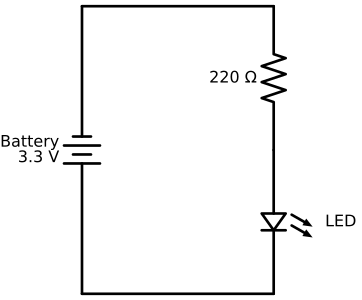
The LED has a forward voltage drop (Vf) of 2.0 V. The voltage remaining across the resistor is . Applying Ohm's law:
The LED gets about 6 mA — enough to be visibly bright without burning out. If you used a smaller resistor (say 47 Ω), the current would be , which might exceed the LED's maximum rating and destroy it. If you used a larger resistor (say 1 kΩ), the current would be — the LED would glow dimly but survive.
Components Draw Current — They Are Not "Given" It
A common misconception: "the power supply pushes 500 mA into the circuit". In reality, the power supply makes current available up to its rated limit. Each component draws whatever current it needs based on its own resistance and operating requirements.
Think of it like a web server rated for 1000 concurrent connections. The server does not force 1000 connections open — clients connect as they need to, and the server handles up to 1000. If 1200 clients try to connect simultaneously, the server fails. Same with a power supply: if components try to draw more current than it can provide, the voltage droops and things stop working.
Current Budget for This Project
Every component in this project draws current from the USB power supply (either directly at 5 V or through the 3.3 V regulator). Here is what each one needs:
| Component | Typical current | Notes |
|---|---|---|
| ESP32-S3 (active, WiFi on) | 200–300 mA | WiFi transmit bursts can briefly spike higher |
| E-ink display (during refresh) | ~20 mA | Near zero when static |
| DS3231 RTC | ~0.2 mA | Negligible |
| MAX98357A at moderate volume | ~500 mA peak | Varies heavily with volume and audio content |
Total peak draw: ~820 mA (when WiFi is transmitting, the display is refreshing, and audio is playing simultaneously).
This means:
- A 500 mA USB charger (common on older USB 2.0 ports) cannot power this project reliably. The ESP32 alone may exceed the budget during WiFi bursts.
- A 1 A charger is marginal — it works during normal operation but may brownout during the alarm (audio + WiFi + display refresh at once).
- A 2 A (10 W) charger handles everything with comfortable headroom.
What happens when current demand exceeds supply
The supply voltage drops ("sags"). If the 5 V rail sags below about 4.5 V, the onboard LDO cannot maintain 3.3 V output. If the 3.3 V rail drops below the ESP32's brownout threshold (~2.7 V), the chip resets. You see this as random reboots, especially during audio playback or WiFi activity.
If your project resets unexpectedly, the most likely cause is an underpowered USB source or a long/thin USB cable with too much resistance. See the Troubleshooting page for specific fixes.
USB-C Power Delivery
USB-C is the power connector used on the ESP32-S3 DevKitC-1 board. Understanding how it delivers power helps you choose the right charger and avoid brownouts.
The default: 5 V without negotiation
Every USB-C port provides 5 V by default. No negotiation is needed. A USB-C source can supply up to 3 A (15 W) at 5 V without any special protocol — the source just needs to be rated for it.
The ESP32-S3 dev board uses this default mode. It does not have a USB Power Delivery (PD) controller on board, so it never asks for anything other than 5 V. As far as the charger is concerned, the dev board is a simple 5 V load.
USB Power Delivery (PD) negotiation
Modern USB-C chargers often support USB PD, a protocol that allows the source and sink to negotiate higher voltages: 9 V, 12 V, 15 V, or 20 V. The negotiation happens over the CC (Configuration Channel) line in the USB-C cable:
- The sink (device) connects to the source (charger)
- The source advertises which voltage/current combinations it supports (called PDOs — Power Data Objects)
- The sink requests a specific PDO
- The source switches to the requested voltage
This does not affect the ESP32 dev board. Because the board has no PD controller, it never requests a higher voltage. It always receives the default 5 V. Even if you plug it into a 100 W USB-C charger, it still gets 5 V — the charger only raises the voltage when explicitly asked.
Current limits from different USB sources
Not all 5 V sources can supply the same current:
| Source type | Maximum current at 5 V | Enough for this project? |
|---|---|---|
| USB 2.0 port (laptop/desktop) | 500 mA | No — ESP32 alone may exceed this |
| USB 3.0 port (laptop/desktop) | 900 mA | Marginal — may brownout during audio |
| USB-C port (no PD) | Up to 3 A | Yes |
| USB-C charger (with PD) | Up to 3 A at 5 V | Yes |
| Dedicated 5V/2A charger | 2 A | Yes |
Recommendation: Use a dedicated USB-C charger rated for at least 10 W (2 A at 5 V). Do not power the project from a laptop USB port for anything other than flashing firmware.
Power, Watts, and Heat
Power is the rate at which energy is consumed. It is measured in watts (W):
Power matters in two places:
1. Choosing a power supply
The total power consumed by this project at peak is approximately:
A 10 W charger provides nearly double this — comfortable headroom.
2. Heat from voltage regulators
The onboard LDO converts 5 V to 3.3 V. The voltage it "removes" (1.7 V) is not free — it becomes heat:
Half a watt is warm but safe. However, if you tried to draw 800 mA through the same LDO:
At this point the regulator gets very hot and may trigger its thermal shutdown. This is why the MAX98357A amplifier is powered directly from the 5 V rail — if its 500 mA went through the 3.3 V regulator, the regulator would overheat (and 3.3 V is not enough for the amp anyway).
Summary
| Concept | Key takeaway |
|---|---|
| Current | The rate of charge flow; measured in amps. Components draw what they need. |
| Ohm's law | V = IR. Use it to calculate current through a resistor. |
| Current budget | Add up the peak current of every component. Your supply must exceed this. |
| USB-C default | Always 5 V. The ESP32 dev board does not negotiate higher voltages. |
| USB PD | Allows higher voltages via CC-line negotiation. Not used by this project. |
| Power (watts) | P = IV. The voltage dropped by a regulator × current = heat generated. |