Essential Components
This page covers every type of passive and active component you will encounter in this project. Each section explains what the component does, why it is needed, and how to choose the right value.
Resistors
A resistor is the simplest electronic component. It resists the flow of current and converts the excess energy to heat. Resistors are used everywhere: current limiting, voltage division, signal conditioning, and pull-up/pull-down networks.
How they work
A resistor with resistance R, carrying current I, drops a voltage V across it (Ohm's law):
The power dissipated as heat is . In this project, all resistors dissipate milliwatts or less — you can ignore thermal concerns.

Worked example: LED current limiting
An LED connected directly to 3.3 V with no resistor would try to draw as much current as the supply can provide, and would burn out instantly. A current-limiting resistor in series controls how much current flows:
3.3V ── [R] ── [LED, Vf=2.0V] ── GND
130 Ω is not a standard value. The nearest standard values are 120 Ω (slightly more current, ~10.8 mA) and 150 Ω (slightly less, ~8.7 mA). Either works — LEDs are not precision instruments. In practice, most people reach for 220 Ω or 330 Ω and accept a dimmer LED in exchange for not needing to do the math.
Standard values and colour codes
Resistors come in standardised value series. The E12 series has 12 values per decade:
10, 12, 15, 18, 22, 27, 33, 39, 47, 56, 68, 82
Multiply by any power of 10: 10 Ω, 100 Ω, 1 kΩ, 10 kΩ, 100 kΩ, 1 MΩ, etc.
Through-hole resistors have coloured bands indicating their value and tolerance. For this project, you can read the value printed on the component bag or measure with a multimeter — colour codes are worth learning eventually but not required right now.
Pull-Up and Pull-Down Resistors
A pull-up or pull-down resistor sets the default state of a signal line when nothing else is actively driving it.
The problem: floating inputs
When a GPIO pin is configured as an input and nothing is connected to it, the voltage on the pin is undefined — it picks up electrical noise and fluctuates randomly between HIGH and LOW. This is called a floating input, and it is the hardware equivalent of reading an uninitialised variable.
How a pull-up resistor solves it
A pull-up resistor connects the pin to VCC through a high-value resistor (commonly 10 kΩ). This pulls the voltage up to VCC when nothing else is driving the line:
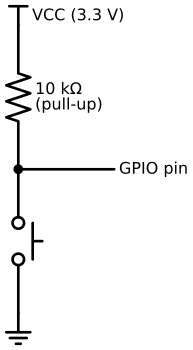
Button open (not pressed): No current flows through the button (the circuit to GND is broken). The pull-up resistor connects the GPIO pin to VCC, and the pin reads HIGH.
Button pressed: The button connects the GPIO pin directly to GND. GND is a much "stronger" driver than the pull-up resistor (0 Ω vs 10 kΩ), so the pin reads LOW. A small current flows through the resistor: — negligible.
Choosing the resistor value
| Value | Effect | Use case |
|---|---|---|
| 1 kΩ | Strong pull-up. Fast signal rise, but wastes 3.3 mA when driven LOW. | High-speed signals, noisy environments |
| 10 kΩ | Standard. Good balance of speed and power. | General purpose, buttons |
| 47 kΩ | Weak pull-up. Slow rise time, very low power. | Battery-powered devices where every µA counts |
| 100 kΩ | Very weak. May be too slow for some signals. | Only when power consumption is critical |
The ESP32-S3 has built-in pull-up resistors (~45 kΩ) on most GPIO pins. These are adequate for buttons in this project. For I2C, the internal pull-ups are too weak — see below.
Pull-down resistors
A pull-down resistor is the inverse: it connects the pin to GND through a resistor, so the default state is LOW instead of HIGH. Pull-downs are less common in this project because buttons are wired to GND (active-low with pull-ups is the conventional pattern).
Why I2C needs external pull-ups
I2C is an open-drain bus: devices can only pull the SDA and SCL lines LOW. No device can drive the line HIGH. Instead, external pull-up resistors (typically 4.7 kΩ) hold the lines HIGH when no device is pulling them LOW.
The pull-up value matters more for I2C than for buttons because:
-
Rise time: The pull-up resistor and the bus capacitance form an RC circuit. A weaker pull-up (higher resistance) means a slower rise from LOW to HIGH. At 400 kHz (fast mode), the signal must rise within ~300 ns. With multiple devices and long wires adding capacitance, a 47 kΩ pull-up may be too slow.
-
Multiple devices: Every device on the bus adds capacitive load. More capacitance requires a stronger (lower value) pull-up.
The standard 4.7 kΩ value works for buses with 1–3 devices and wires under 30 cm — which describes this project exactly.
Capacitors
A capacitor stores electrical charge temporarily. It consists of two conductive plates separated by an insulator. When voltage is applied, charge accumulates on the plates; when the voltage source is removed, the stored charge can supply current briefly.
The software analogy
A capacitor is like a small buffer or cache. It absorbs brief spikes and fills brief gaps, smoothing out transient variations so downstream components see a stable supply.

Decoupling Capacitors
This is the most important use of capacitors in digital circuits, and it is worth understanding in detail.
The problem: Digital chips switch their internal transistors millions of times per second. Each switching event draws a tiny burst of current from the VCC pin. These bursts happen so fast that even short wires have too much inductance to deliver the current instantly. The result: the voltage on the chip's VCC pin dips briefly (a "voltage droop"), potentially causing the chip to malfunction.
The solution: A small capacitor (typically 100 nF = 0.1 µF) placed physically close to the chip's VCC and GND pins. The capacitor acts as a tiny local battery, supplying the burst current from its stored charge while the main power supply catches up.
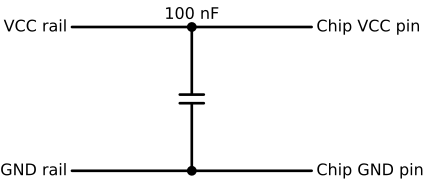
Why placement matters: The capacitor must be close to the chip. If it is far away, the wire inductance between the capacitor and the chip defeats the purpose — the burst current still cannot arrive fast enough.
Standard values:
- 100 nF (0.1 µF) ceramic — for high-frequency noise. One per chip, per VCC pin.
- 10 µF electrolytic or tantalum — for bulk energy storage. One per voltage rail, near where power enters the board.
On breadboards: Breadboard wiring has relatively low inductance (the connections are short), so you can often get away without decoupling capacitors during prototyping. But if you see erratic behaviour — random resets, I2C errors, display glitches — adding a 100 nF cap between a chip's VCC and GND pins is the first thing to try.
On the breakout boards in this project: The DS3231 and MAX98357A breakout boards include decoupling capacitors on the board. You do not need to add external ones.
Voltage Regulators
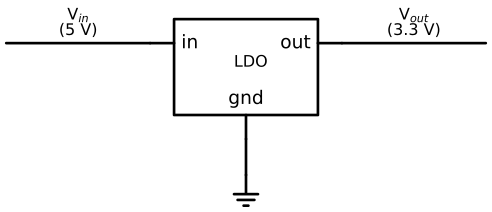
A voltage regulator takes a higher input voltage and produces a stable, lower output voltage. The ESP32-S3 DevKitC-1 board has an onboard regulator that converts USB 5 V to 3.3 V.
Linear regulators (LDO)
The simplest type. A linear regulator is essentially a variable resistor controlled by a feedback loop: it continually adjusts its resistance to maintain a constant output voltage regardless of input fluctuations or load changes.
Advantages:
- Simple, cheap, low noise
- Requires only a couple of capacitors (input and output) to operate
Disadvantages:
- Wastes energy as heat:
- Output must always be lower than input
- The input must exceed the output by at least the dropout voltage (typically 0.3–1 V). Below that, the output sags. For a 3.3 V output with a 0.5 V dropout, the input must be at least 3.8 V.
The regulator on the ESP32-S3 DevKitC-1 can supply approximately 800 mA. The 3.3 V components in this project draw about 350 mA peak — well within the limit.
Switching regulators (buck converters)
A switching regulator rapidly switches the input on and off and uses an inductor and capacitor to smooth the output. It is much more efficient (85–95% vs ~65% for the LDO in this project) but noisier and more complex.
Switching regulators are inside every USB charger — that is how a mains-powered charger produces 5 V efficiently. You will not build one for this project, but knowing they exist helps when you read datasheets that mention "DCDC" or "buck/boost" options.
LEDs
A light-emitting diode converts electrical energy to light. It is a diode, which means current flows through it in only one direction.
Forward voltage
Every LED has a forward voltage drop (Vf) — the minimum voltage across it for current to flow and light to be emitted. This varies by colour:
| Colour | Typical Vf |
|---|---|
| Red | 1.8–2.0 V |
| Yellow / Green | 2.0–2.2 V |
| Blue / White | 3.0–3.3 V |

Polarity
LEDs have two legs:
- Anode (+) — the longer leg. Connect to the positive side of the circuit.
- Cathode (−) — the shorter leg, with a flat edge on the plastic housing. Connect toward GND.
Connecting an LED backwards does not damage it (unlike connecting a 5 V signal to a 3.3 V input) — it simply does not light up.
Current limiting is required
An LED must always be used with a current-limiting resistor in series. Without one, the LED's resistance drops as it heats up, causing it to draw more current, heat up further, and burn out. See the resistor section above for how to calculate the value.
Buttons as Circuit Elements
The tactile push buttons in this project are momentary normally-open (NO) switches. Electrically, a button is the simplest possible component: a wire that is either connected or disconnected.
When not pressed:    GPIO ──── (open) ──── GND    → circuit is broken
When pressed:        GPIO ──────────────── GND    → circuit is complete, pin sees 0V
Combined with a pull-up resistor (see above):
- Not pressed: GPIO reads HIGH (pulled to VCC by the resistor)
- Pressed: GPIO reads LOW (connected to GND through the button)
Mechanical bounce
When a button is pressed, the metal contacts do not make a clean single connection. They physically bounce, making and breaking contact several times over 5–20 ms. To the microcontroller (sampling at MHz speeds), this looks like multiple rapid presses.
Software debouncing is required: after detecting a press, ignore further changes for a debounce period (typically 50–100 ms). The button driver implements this.
Crystals and Oscillators
A crystal oscillator is a component that vibrates at a very precise frequency when voltage is applied. Microcontrollers and RTCs use them as their "heartbeat" to keep time and synchronise operations.

In this project
-
ESP32-S3: Has an onboard 40 MHz crystal. This drives the CPU clock and all peripheral timing (SPI, I2C, I2S clocks are divided down from this). You do not interact with it directly.
-
DS3231 RTC: Contains a temperature-compensated crystal oscillator (TCXO) running at 32.768 kHz. This frequency is not arbitrary — it is exactly 2^15 (32768). A 15-stage binary counter divides it down to exactly 1 Hz, producing a precise one-second tick with trivially simple hardware. The temperature compensation adjusts the oscillator's drive to counteract the crystal's natural frequency drift with temperature, keeping the clock accurate to about ±2 minutes per year.
Speakers as Electrical Loads
A speaker converts electrical signals into sound by vibrating a cone. Inside the speaker is a coil of wire (a voice coil) that moves in a magnetic field when current passes through it.

Impedance
A speaker's impedance (measured in ohms) determines how much current it draws for a given voltage. The speakers used in this project are 4 Ω:
This is why you cannot connect a speaker directly to a GPIO pin — the ESP32's GPIO can supply at most ~40 mA. The MAX98357A amplifier handles the high-current drive: it takes the low-power I2S digital signal from the ESP32 and converts it to a high-current analog signal suitable for the speaker.
Why the amplifier is powered at 5 V
The MAX98357A is a Class-D amplifier that can deliver up to 3 W into a 4 Ω speaker. Power output is proportional to supply voltage squared:
At 3.3 V, the maximum power drops to — noticeably quieter. This is why the MAX98357A datasheet specifies 5 V power, and why the wiring guide emphasises connecting VIN to the 5 V rail, not 3.3 V.