GPIO
GPIO stands for General Purpose Input/Output. It is the simplest interface between a microcontroller and the outside world: a pin is either HIGH (3.3 V) or LOW (0 V).
Input vs. Output Mode
Every GPIO pin can be configured as either an input or an output:
- Output mode — the firmware sets the pin HIGH or LOW. Use this to control the e-ink RST pin, the display CS line, or the MAX98357A shutdown pin.
- Input mode — the firmware reads the pin state. Use this for buttons and the e-ink BUSY pin.
In ESP-IDF, you configure a pin with gpio_config_t:
gpio_config_t cfg = {
    .pin_bit_mask = (1ULL << GPIO_NUM_8),   // GPIO8 (BTN_SELECT)
    .mode         = GPIO_MODE_INPUT,
    .pull_up_en   = GPIO_PULLUP_ENABLE,
    .pull_down_en = GPIO_PULLDOWN_DISABLE,
    .intr_type    = GPIO_INTR_NEGEDGE,      // interrupt on falling edge (press)
};
gpio_config(&cfg);
Pull-Up Resistors
When a button is not pressed, what value should the GPIO read?
Without any external connection, a floating input pin will pick up electrical noise and read random values — the hardware equivalent of an uninitialized variable.
A pull-up resistor connects the pin to VCC (3.3 V) through a high-value resistor (typically 10 kΩ). This means:
- When the button is open (not pressed): pin reads HIGH (3.3 V)
- When the button is closed (pressed): pin connects to GND and reads LOW (0 V)
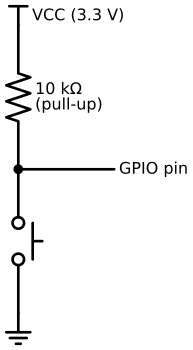
The ESP32-S3 has built-in pull-up resistors on most GPIO pins (~45 kΩ internal), so you
do not need external resistors in this project. Enable them in firmware with
GPIO_PULLUP_ENABLE.
For a deeper explanation of how pull-up resistors work and how to choose values, see Essential Components: Pull-Up Resistors.
Interrupts
Polling a button pin in a loop wastes CPU cycles. Instead, configure a GPIO interrupt that fires a callback when the pin changes state.
| Interrupt type | When it fires |
|---|---|
GPIO_INTR_POSEDGE | Rising edge: LOW → HIGH |
GPIO_INTR_NEGEDGE | Falling edge: HIGH → LOW (button press) |
GPIO_INTR_ANYEDGE | Any change |
GPIO_INTR_LOW_LEVEL | While pin is LOW |
For buttons connected to GND with pull-ups, use GPIO_INTR_NEGEDGE (fires on press).
ISR rules:
- ISRs (interrupt service routines) run in a privileged, time-sensitive context
- Do not call
malloc,printf, or any FreeRTOS function that might block from an ISR - The correct pattern is to send to a FreeRTOS queue from the ISR and process in a task:
// ISR — fires on button press
static void IRAM_ATTR button_isr(void *arg) {
    uint32_t gpio_num = (uint32_t)arg;
    xQueueSendFromISR(button_event_queue, &gpio_num, NULL);
}

// Task — processes button events
static void button_task(void *arg) {
    uint32_t gpio_num;
    for (;;) {
        if (xQueueReceive(button_event_queue, &gpio_num, portMAX_DELAY)) {
            // handle button press
        }
    }
}
PWM Output
Some GPIO pins support PWM (Pulse-Width Modulation) output via the LEDC peripheral. This is how the e-ink front light brightness is controlled: instead of fully on or off, the pin pulses at high frequency with a variable duty cycle.
GPIO2 is used for the front light PWM. The firmware configures it with ledc_timer_config
and ledc_channel_config — this is covered in the e-ink driver doc.
ESP32-S3 Specifics
- Most GPIO pins are fully general purpose — you can use them as input, output, or for peripheral functions (SPI, I2C, I2S, LEDC).
- Avoid strapping pins (GPIO0, GPIO45, GPIO46) — these are sampled at boot to determine boot mode and flash configuration. A button on GPIO0 that is held down during power-on will put the chip in download mode.
- Avoid USB pins (GPIO19, GPIO20) on boards that use USB OTG.
- GPIO43 and GPIO44 are UART0 TX/RX used for the serial console and flashing.
The pin table lists all pins used in this project and which ones to avoid.