Reading Circuit Diagrams
A circuit diagram (or schematic) is a map of how components are connected electrically. It uses standard symbols to represent each component and lines to represent wires. Schematics tell you what connects to what — they do not show physical size, location on a board, or wire colours.
Compare this to the wiring diagrams in this project: those show physical connections in a breadboard context. This page teaches you to read the schematic version.
Standard symbols used in this project
Resistor

A zigzag line (US convention) or a rectangle (IEC convention) represents a resistor. The label shows the resistance value (Ω, kΩ, or MΩ). A dashed outline means the resistor is internal to a chip — in this project, the dashed resistors on the button circuit represent the ESP32's built-in pull-ups.
Pull-up resistor with button
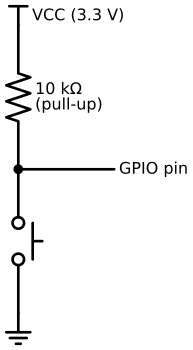
This is the pull-up pattern used for every button in this project. The resistor connects the GPIO pin to VCC; the button connects it to GND. When the button is open, the GPIO reads HIGH. When pressed, GND overpowers the resistor and the GPIO reads LOW.
Capacitor

Two parallel lines (the plates). The longer line is the positive terminal (for polarised capacitors). When placed between VCC and GND in a schematic, a capacitor is acting as a decoupling (bypass) capacitor — it absorbs brief current spikes so the chip's supply voltage stays stable.
LED

A diode triangle with arrows pointing away from it (the emitted light). Current flows from anode (triangle base) to cathode (bar). The LED is always shown with a series resistor — without it, the LED would burn out.
Voltage regulator
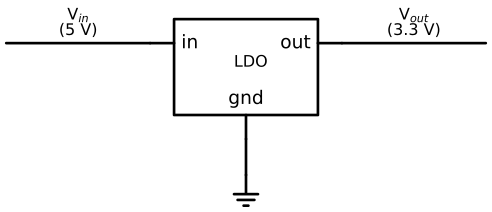
A three-terminal block with V_in on one side, V_out on the other, and GND at the bottom. On the ESP32 DevKitC-1, this is built into the board and converts 5 V USB input to 3.3 V for the logic circuitry.
Crystal oscillator

A rectangular body with two leads and vertical lines at each end. The label shows the frequency (e.g., 32.768 kHz for the DS3231 RTC). The crystal vibrates at that frequency when driven by the chip, producing the timing reference the chip needs to keep accurate time.
Speaker

A rectangle with a triangle and arc — stylised cross-section of a speaker cone. The two input terminals carry the audio signal. In this project the speaker is driven differentially by the MAX98357A amplifier.
Wires and junctions
A line between two component terminals is a wire. Two crossing lines are not connected unless there is a filled dot at the crossing:

Wires that share the same net label (e.g., 3.3 V, GND, SDA) are connected
even if no line is drawn between them. This is used to avoid cluttered crossing lines in
complex schematics.
Power symbols
| Symbol | Meaning |
|---|---|
⊤ with label (Vdd arrow) | Positive supply rail — VCC, 3.3 V, 5 V |
⏚ (three descending lines) | Ground — 0 V reference |
All components sharing the same ground symbol are electrically connected, even if the schematic does not draw a wire between them.
IC boxes
A rectangle with labelled pins on each side represents an integrated circuit. Pin labels inside the box are the signal names; pin labels outside the box are the GPIO numbers or net names:
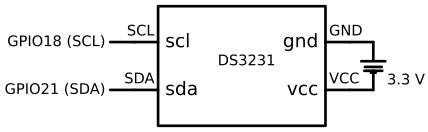
In this project the ESP32-S3 is shown as an IC box with all its relevant GPIO pins named.
How to trace a signal
To follow a signal through a schematic:
- Find the signal source (e.g., a GPIO pin on the ESP32 box).
- Follow the line leaving that pin.
- At any dot junction, the signal branches to all connected lines.
- When you reach a net label (
SDA,GND, etc.), find all other places that same label appears — they are all connected. - Continue until you reach the destination component pin.
Example — tracing SDA from ESP32 to DS3231:
ESP32 GPIO21 → SDA line → dot junction (pull-up taps off here) → DS3231 SDA pin
                                │
                              R 4.7 kΩ
                                │
                             3.3 V (VCC)
Schematic vs wiring diagram
| Schematic | Wiring diagram | |
|---|---|---|
| Shows | Electrical connections | Physical connections |
| Symbols | Standard component symbols | Component outlines + colour-coded wires |
| Position | Irrelevant — layout is logical | Matches breadboard layout |
| Use for | Understanding the circuit | Building the circuit |
Use the schematic to understand why a circuit works. Use the wiring diagram to know where to put each wire on the breadboard.