Wiring the MAX98357A Amplifier
The MAX98357A is a Class-D I2S amplifier. It takes digital audio directly from the ESP32 over three wires and drives a speaker — no separate DAC or analog amplifier needed.
Circuit Diagram
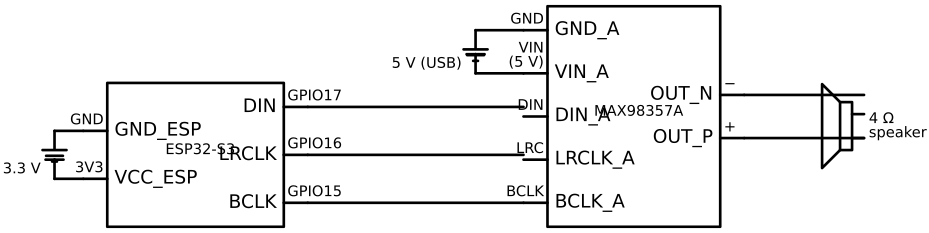
The schematic shows the I2S digital signals from the ESP32, the 5 V power path to the amplifier (note: not 3.3 V), and the differential output to the 4 Ω speaker.
Wiring Diagram
Pin Table
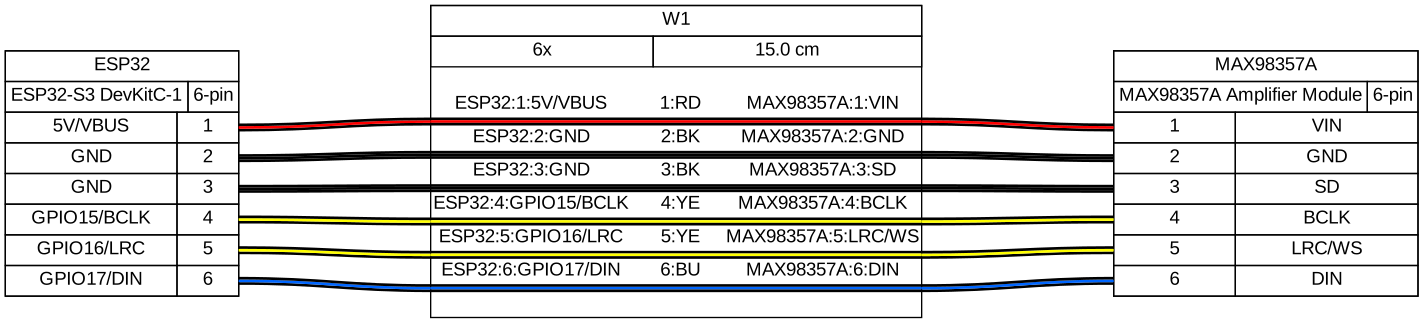
| MAX98357A pin | Wire colour | ESP32-S3 pin label | GPIO # | Notes |
|---|---|---|---|---|
| VIN | Red | 5V (VBUS) | — | Must be 5 V — do not use 3V3 |
| GND | Black | GND | — | |
| BCLK | Yellow | GPIO15 | 15 | Bit clock |
| LRC (WS) | Yellow | GPIO16 | 16 | Left/Right clock (word select) |
| DIN | Blue | GPIO17 | 17 | Serial audio data |
| SD (gain/shutdown) | Black | GND | — | Connect to GND for left channel; see note below |
| GAIN | (not connected) | — | — | Leave floating for default 9 dB gain |
Connect the speaker to the + and − output pads on the breakout board. Speaker polarity does not affect mono performance but wire it consistently.
SD Pin Options
The SD (Shutdown/Gain) pin selects which audio channel the amplifier outputs:
| SD pin | Output |
|---|---|
| GND | Left channel |
| Floating | (Left + Right) / 2 — mono mix |
| 100 kΩ to VCC | Right channel |
For an alarm clock playing mono WAV files, either GND or floating works. GND is simpler.
Speaker Selection
Use a 4 Ω, 2–3 W speaker. The MAX98357A can deliver ~3 W into 4 Ω at 5 V.
Physical size: a 40 mm round speaker fits well in most clock enclosures. The 50 mm variant produces better bass but is harder to fit.
Keep speaker wires short (under 20 cm on a breadboard). Long speaker wires act as antennas and can introduce RF interference into the I2S lines.
Verification
Ensure a short WAV file (8 kHz or 44.1 kHz, 16-bit, mono or stereo) is in the LittleFS
partition as /lfs/alarms/test.wav (see the
Audio Storage page). Run:
// I2S init (see I2S concepts doc)
// Open WAV file and stream to I2S
FILE *f = fopen("/lfs/alarms/test.wav", "rb");
fseek(f, 44, SEEK_SET);  // skip WAV header

uint8_t buf[1024];
size_t bytes_read, bytes_written;
while ((bytes_read = fread(buf, 1, sizeof(buf), f)) > 0) {
    i2s_channel_write(tx_handle, buf, bytes_read, &bytes_written, portMAX_DELAY);
}
fclose(f);
You should hear audio from the speaker.
If the speaker produces a hissing noise but no audio:
- Check DIN is connected to GPIO17 (not DOUT — there is no DOUT on the MAX98357A)
- Confirm the I2S sample rate matches the WAV file's sample rate
- Verify VIN is actually 5 V (measure with multimeter)
Gotchas
5 V power is required — the MAX98357A will not produce useful audio from 3.3 V.
Current peaks — at full volume, the MAX98357A can draw over 1 A from the 5 V rail momentarily. A USB charger rated below 1 A (5 W) may cause the ESP32 to brownout. Use a 10 W (2 A) charger.
Sample rate — the I2S clock is configured in firmware for a specific sample rate (typically 44100 Hz). If the WAV file has a different sample rate, the audio will play at the wrong speed. The audio driver doc shows how to read the sample rate from the WAV header and reconfigure I2S accordingly.