Wiring the Discrete Backup Circuit
The system runs from USB 5 V at all times. A separate low-power backup circuit using an ATtiny85 microcontroller and AA batteries handles the alarm independently if USB power is lost. See the battery backup concepts page for the design rationale, ATtiny deep sleep details, and battery life calculations.
How This Fits Into the Power Architecture
USB-C 5V ──► ESP32 (3.3V LDO) ──► all peripherals
              │
              └──► Voltage divider (GPIO41) — detects USB presence

When USB power is absent (ESP32 is off):
2× AA (3V) ──► ATtiny85 (deep sleep, ~0.1 µA)
                │
           DS3231 SQW ──► ATtiny INT0 (wakes on DS3231 alarm interrupt)
                           │
                       ATtiny PB0 ──► PN2222 base ──► active piezo buzzer
The ESP32 sets the DS3231 alarm registers over I2C while powered. When USB power is lost, the ESP32 shuts down, but the DS3231 keeps running on its CR2032 coin cell and fires the SQW interrupt at the programmed alarm time. The ATtiny wakes, sounds the buzzer, and handles SNOOZE and DISMISS buttons — all without the ESP32.
Components for This Step
| Item | Notes |
|---|---|
| ATtiny85 (DIP-8) | The backup alarm MCU. Runs at 1.8–5.5V; deep sleep ~0.1 µA. |
| 2× AA battery holder | Through-hole, wire leads. Provides 3V supply. |
| AA batteries (×2) | Alkaline recommended. |
| Active piezo buzzer (3V) | Must be active (built-in oscillator). A passive buzzer requires a PWM signal and will not work here. |
| PN2222 NPN transistor (TO-92) | Drives the buzzer from ATtiny PB0. |
| Resistor, ~1 kΩ | Base resistor for the PN2222. Limits base current from ATtiny PB0. |
| Resistors, 2× 10 kΩ | External pull-ups for SNOOZE (GPIO38) and DISMISS (GPIO39) lines. |
| Resistors, 2× 100 kΩ | USB-present voltage divider (R1 and R2 for GPIO41). |
Wiring Diagram

Circuit Diagram
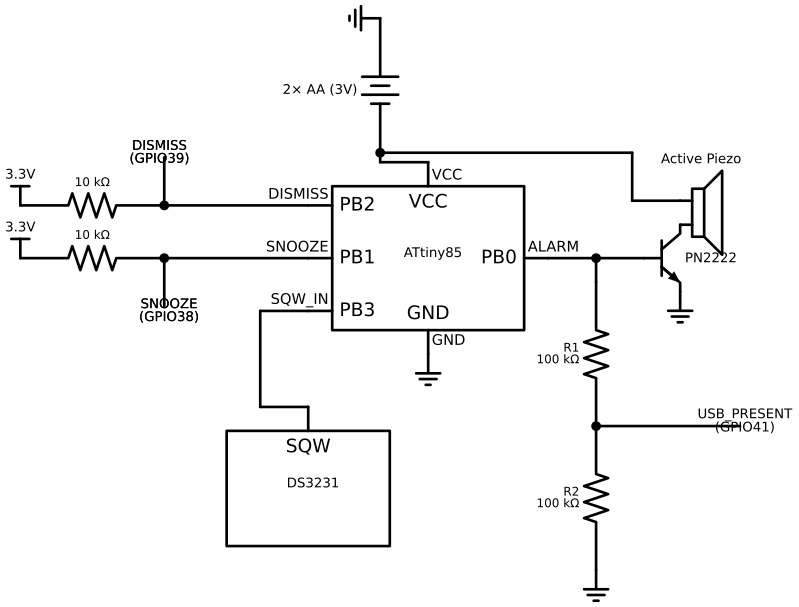
Pin Table A — DS3231 SQW (Shared Alarm Interrupt)
| Source | Wire colour | Destination 1 | Destination 2 | Notes |
|---|---|---|---|---|
| DS3231 SQW | Orange | ATtiny85 PB3 (pin 2) | ESP32 GPIO42 (RTC_INT) | Open-drain; DS3231 drives LOW at alarm time. Both listeners are passive. |
The SQW line is shared between the ATtiny and the ESP32. When USB power is present the ESP32 catches the interrupt and fires the full alarm. When USB is absent the ATtiny is the only listener.
SQW should idle at ~3.3 V. If it reads ~0 V or floats, add a 10 kΩ pull-up from SQW to 3.3 V. Many DS3231 breakout boards include this pull-up — check your specific module before adding one.
Pin Table B — ATtiny85 to Buzzer (via PN2222)
| ATtiny85 pin | Signal | Connects to | Notes |
|---|---|---|---|
| PB0 (pin 5) | Buzzer drive | PN2222 base (via 1 kΩ resistor) | HIGH = buzzer on |
| — | PN2222 collector | Buzzer − terminal | |
| — | PN2222 emitter | GND | |
| — | Buzzer + terminal | AA holder V+ (3V) | Active buzzer draws current from AA supply |
Pin Table C — AA Holder to ATtiny85
| AA holder pin | Wire colour | ATtiny85 pin | Notes |
|---|---|---|---|
| V+ (3V) | Red | VCC (pin 8) | |
| GND | Black | GND (pin 4) |
Pin Table D — SNOOZE and DISMISS (Shared Button Lines)
| ESP32 GPIO | ATtiny85 pin | Pull-up | Button |
|---|---|---|---|
| GPIO38 (SNOOZE) | PB1 (pin 6) | 10 kΩ to 3.3V | SNOOZE button |
| GPIO39 (DISMISS) | PB2 (pin 7) | 10 kΩ to 3.3V | DISMISS button |
The button lines connect to both the ESP32 and the ATtiny simultaneously. When USB power is present the ESP32 handles button input via its internal pull-ups. When USB is absent, the ESP32 is off and its internal pull-ups are inactive — the 10 kΩ external pull-up resistors ensure the ATtiny inputs stay HIGH (not pressed) when the buttons are open.
An ESP32 internal pull-up only works when the ESP32 is powered and the GPIO is configured in firmware. When the ESP32 has no power, the pull-up is off and the ATtiny input floats. A floating input reads random noise as button presses. External 10 kΩ resistors from the button lines to 3.3 V (or to the AA-derived 3 V reference) solve this regardless of whether the ESP32 is on or off. See the battery backup concepts page for a full explanation.
Pin Table E — USB-Present Voltage Divider (GPIO41)
| Node | Component | Connects to | Notes |
|---|---|---|---|
| USB-C 5 V rail | R1 top (100 kΩ) | — | Divider input — must be the USB rail, not the 5V bus |
| R1 bottom / R2 top | Junction | ESP32 GPIO41 | Reads ~2.5 V when USB present; 0 V when absent |
| R2 bottom | GND | — |
If the divider taps the ESP32's 5V pin rather than the USB-C connector VBUS, it reads the regulated rail which is always present when the ESP32 is powered — GPIO41 would never go LOW. Wire R1 directly to the USB-C connector's VBUS line.
Verification
Step 1 — Measure ATtiny supply voltage
With AA batteries installed, measure voltage at ATtiny VCC (pin 8) to GND (pin 4). Should read 2.7–3.2 V.
Step 2 — Buzzer test on SQW trigger
Program the DS3231 Alarm 1 to fire in 2 minutes (use a minimal I2C test sketch on the ESP32 to write the alarm registers). Then disconnect USB. Wait for the alarm time.
Expected: buzzer sounds within 1 second of the alarm time.
Step 3 — SNOOZE button
While the buzzer is sounding, press SNOOZE. Expected: buzzer stops, then refires after approximately 9 minutes.
Step 4 — DISMISS button
While the buzzer is sounding (on a fresh alarm), press DISMISS. Expected: buzzer stops and does not refire.
Step 5 — USB-present pin transitions
Flash a minimal sketch that logs GPIO41 every second:
gpio_config_t cfg = {
    .pin_bit_mask = (1ULL << GPIO_NUM_41),
    .mode         = GPIO_MODE_INPUT,
    .pull_up_en   = GPIO_PULLUP_DISABLE,
    .pull_down_en = GPIO_PULLDOWN_DISABLE,
    .intr_type    = GPIO_INTR_DISABLE,
};
gpio_config(&cfg);

while (1) {
    ESP_LOGI("pwr", "USB present: %d", gpio_get_level(GPIO_NUM_41));
    vTaskDelay(pdMS_TO_TICKS(1000));
}
Connect USB → log shows USB present: 1. Unplug USB → log shows USB present: 0 within ~1 second.
Gotchas
Active vs passive piezo — an active buzzer has two wires and an internal oscillator; just apply 3 V DC and it beeps. A passive buzzer looks the same externally but requires a PWM signal at the resonant frequency. If you connect a passive buzzer, it will not sound. Check the datasheet or measure: an active buzzer will draw a few mA with DC applied; a passive buzzer draws nearly zero.
Missing external pull-ups on SNOOZE/DISMISS — if the 10 kΩ pull-up resistors are omitted, the ATtiny will read the button lines as random noise and may repeatedly snooze or dismiss the alarm without any button press. This is the most likely cause of a backup alarm that stops immediately on its own.
SQW pull-up missing — if SQW floats LOW, the ATtiny INT0 fires immediately on boot and the buzzer sounds indefinitely. Measure SQW with a multimeter — it must idle HIGH (~3.3 V) before wiring the ATtiny.
ATtiny pinout (DIP-8):
        ATtiny85 DIP-8
      ┌───────────────┐
 PB5 │1 (RST)   VCC 8│ ← AA V+
 PB3 │2 (INT0)  PB2 7│ → DISMISS
 PB4 │3         PB1 6│ → SNOOZE
 GND │4         PB0 5│ → Buzzer drive
      └───────────────┘
Pin 1 is marked with a notch or dot on the physical chip.