Wiring the Buttons
Six momentary tactile push buttons let you interact with the clock — setting alarms, snoozing, dismissing, and navigating menus.
How Buttons Work
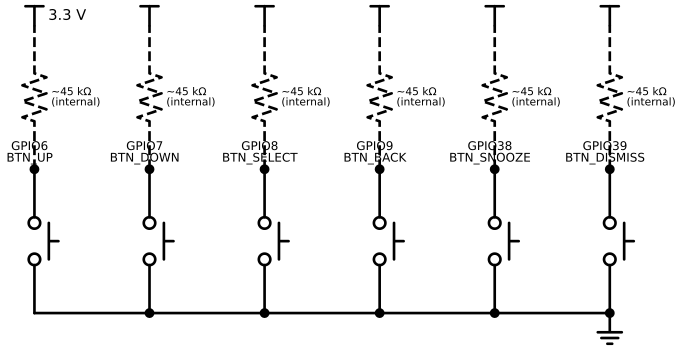
Each button connects one GPIO pin to GND through a simple switch:
3.3 V ── [internal 45kΩ pull-up] ── GPIO pin ──┬── GND (via button, when pressed)
                                                 │
                                                 └── (open, when not pressed)
- Not pressed: GPIO reads HIGH (3.3 V, pulled up)
- Pressed: GPIO reads LOW (connected to GND)
The ESP32-S3 has built-in ~45 kΩ pull-up resistors that can be enabled in firmware, so no external resistors are needed.
Pin Table
| Button | Function | Wire colour | ESP32-S3 pin label | GPIO # |
|---|---|---|---|---|
| BTN_UP | Increment value / scroll up | Green | GPIO6 | 6 |
| BTN_DOWN | Decrement value / scroll down | Green | GPIO7 | 7 |
| BTN_SELECT | Confirm / enter submenu | Green | GPIO8 | 8 |
| BTN_BACK | Cancel / go back | Green | GPIO9 | 9 |
| BTN_SNOOZE | Snooze active alarm | Green | GPIO38 | 38 |
| BTN_DISMISS | Dismiss active alarm | Green | GPIO39 | 39 |
Each button has two terminals. Connect one terminal to the GPIO pin and the other to GND. The two terminals are interchangeable — polarity does not matter for a simple switch.
Circuit Diagram
The schematic shows all six buttons. Each button connects a GPIO pin to GND. The dashed resistors represent the ESP32's internal pull-ups (~45 kΩ) — no external resistors are needed for this project.
Wiring Diagram
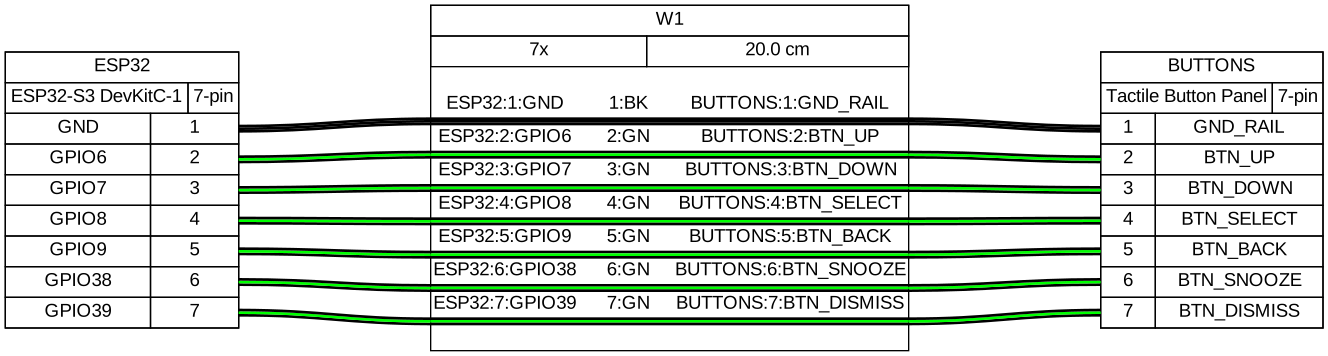
All buttons share the GND rail — run one wire from the ESP32's GND pin to the breadboard GND rail, then connect all button GND terminals to that rail.
Verification
Flash a minimal button test that prints the button name on press:
// Configure GPIO6 as input with pull-up
gpio_config_t cfg = {
    .pin_bit_mask = (1ULL << GPIO_NUM_6),
    .mode         = GPIO_MODE_INPUT,
    .pull_up_en   = GPIO_PULLUP_ENABLE,
    .intr_type    = GPIO_INTR_DISABLE,
};
gpio_config(&cfg);

// Poll in a loop
while (1) {
    if (gpio_get_level(GPIO_NUM_6) == 0) {
        printf("BTN_UP pressed\n");
        vTaskDelay(pdMS_TO_TICKS(200));  // simple debounce
    }
    vTaskDelay(pdMS_TO_TICKS(10));
}
Press each button and confirm the correct message appears. The button driver doc replaces this polling loop with interrupt-driven debounce.
Gotchas
Do not use GPIO0 — it is a strapping pin. Holding it LOW when the ESP32 powers on enters bootloader mode instead of running firmware. If you accidentally use GPIO0 for BTN_UP and press it during power-on, the ESP32 will not start.
No pull-ups on ESP32-classic GPIO 34–39 — if you are using a classic ESP32 (not S3) and choose GPIO 34–39 for BTN_SNOOZE and BTN_DISMISS, you must add external 10 kΩ pull-up resistors to 3.3 V. The ESP32-S3 does not have this limitation for these pins.
Debouncing is required in firmware — a mechanical button contact bounces (rapidly opens and closes) for 5–50 ms when pressed. Without debouncing, one physical press generates dozens of events. The button driver doc handles this with a FreeRTOS timer.