Wiring the E-ink Display
The GDEY042T81-FL02 is a 4.2" e-ink display with a built-in front light. It connects to the ESP32 via SPI and requires three additional control GPIO pins.
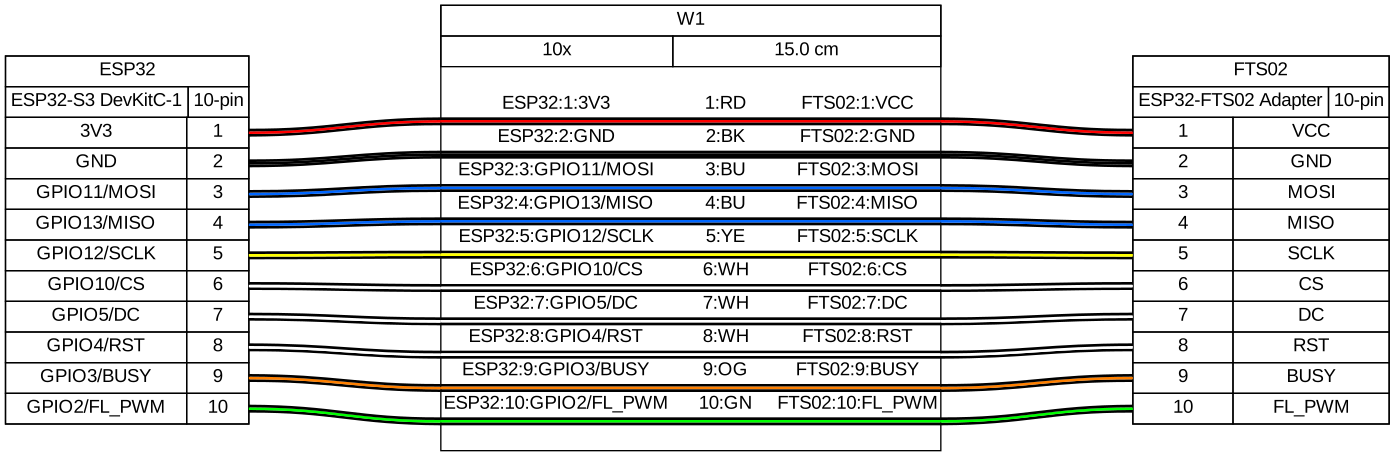
The display uses a 24-pin FPC (flexible printed circuit) ribbon connector. You must use the ESP32-FTS02 adapter board to break out these signals to standard 2.54 mm pin headers. Order the adapter from the same supplier as the display.
Adapter Board Setup
- Gently lift the FPC connector latch on the adapter board
- Insert the display ribbon cable with the contacts facing down
- Press the latch down to lock the cable in place
- Connect pin headers to the adapter board's output pads
Pin Table
| Adapter board pin | Wire colour | ESP32-S3 pin label | GPIO # | Notes |
|---|---|---|---|---|
| VCC | Red | 3V3 | — | 3.3 V |
| GND | Black | GND | — | |
| MOSI (SDI) | Blue | GPIO11 | 11 | SPI bus (display only) |
| MISO (SDO) | Blue | GPIO13 | 13 | SPI bus; display rarely sends data |
| SCLK | Yellow | GPIO12 | 12 | SPI bus (display only) |
| CS | White | GPIO10 | 10 | Display chip select — active LOW |
| DC | White | GPIO5 | 5 | LOW = command, HIGH = data |
| RST | White | GPIO4 | 4 | Active LOW; pulse LOW for ≥10 ms on init |
| BUSY | Orange | GPIO3 | 3 | HIGH while display is refreshing; wait until LOW |
| FL_PWM (front light) | Green | GPIO2 | 2 | PWM brightness control via LEDC |
Circuit Diagram
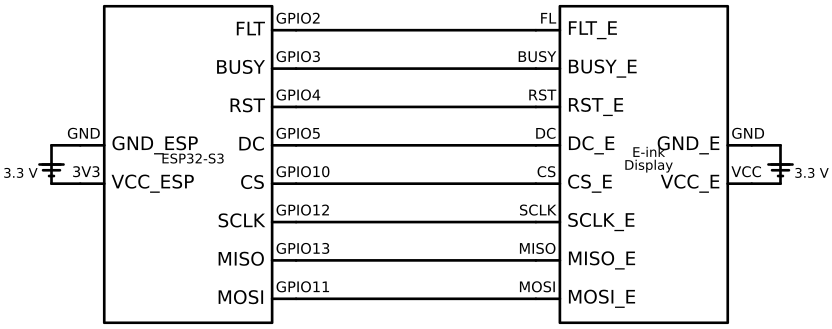
The schematic shows the SPI bus (MOSI, MISO, SCLK), the display-specific control lines (CS, DC, RST, BUSY, frontlight PWM), and power connections.
Wiring Diagram
Verification
Flash minimal display init code to confirm the wiring before adding more components:
// After SPI bus init and device add (see SPI concepts doc)
// Pulse RST
gpio_set_level(GPIO_NUM_4, 0);
vTaskDelay(pdMS_TO_TICKS(15));
gpio_set_level(GPIO_NUM_4, 1);
vTaskDelay(pdMS_TO_TICKS(100));

// Wait for BUSY to go LOW (display ready)
while (gpio_get_level(GPIO_NUM_3) == 1) {
    vTaskDelay(pdMS_TO_TICKS(10));
}
printf("Display ready\n");
If Display ready never prints, BUSY is stuck HIGH. Check:
- RST is connected (not floating) — a floating RST can hold the controller in reset
- VCC is actually reaching the adapter board (measure with multimeter)
- CS is not floating — if unconnected, the SSD1683 may not initialise
Gotchas
BUSY polarity — the SSD1683 holds BUSY HIGH while busy and LOW when ready (active HIGH busy). Do not confuse this with other e-ink controllers that use active-LOW.
RST pulse width — the SSD1683 datasheet specifies ≥10 ms for the reset pulse. 15 ms is reliable.
Do not power-cycle during a refresh — removing power while a refresh is in progress can permanently damage individual pixels. Always wait for BUSY to go LOW before cutting power.
Full refresh takes ~2 seconds — this is normal for e-ink. Do not interpret a 2-second delay as a hang. Partial refresh (~0.3 s) is faster but accumulates ghosting — run a full refresh at least every 10 partial refreshes.
GxEPD2 and PSRAM — the GxEPD2 library allocates a ~15 KB frame buffer. The ESP32-S3
The DevKitC-1 N16R8 (8 MB PSRAM) and WROOM-2 N32R16 (16 MB PSRAM) both handle this,
but on a classic ESP32 without PSRAM you may see OOM panics. Use partial window mode (setPartialWindow) if PSRAM is unavailable.