Wiring the Proximity Sensor
The APDS-9960 is a proximity sensor the size of a cell phone camera lens. It uses a built-in 940 nm infrared LED and a photodiode to detect a hand approaching the clock in the dark, triggering the front light without requiring any button press. The same chip is used in smartphones as the face-proximity sensor that turns off the screen during a call.
How the APDS-9960 Works
The sensor contains an IR LED that pulses at a controlled rate. A photodiode measures the intensity of reflected IR light. The onboard ADC converts this into an 8-bit proximity count (0–255): 0 means nothing nearby, higher values mean closer objects.
Two threshold registers control when the INT pin fires:
| Register | Address | Purpose |
|---|---|---|
| PILT | 0x89 | Proximity interrupt low threshold — INT fires when count drops below this |
| PIHT | 0x8B | Proximity interrupt high threshold — INT fires when count exceeds this |
When the proximity count exceeds PIHT, the INT pin is pulled LOW. Firmware reads the proximity register to confirm, then writes to the PICLEAR register (0xE5) to reset INT. This is the opposite polarity from the old HC-SR501 PIR sensor (which was active HIGH).
Communication is over I2C at address 0x39, sharing the bus with the DS3231 RTC at 0x68.
Pin Table
| APDS-9960 pin | Signal | Wire colour | ESP32-S3 pin | Notes |
|---|---|---|---|---|
| VCC | 3.3V power | Red | 3V3 | 3.3V only — do not connect to 5V |
| GND | Ground | Black | GND | Common ground |
| SDA | I2C data | Blue | GPIO21 | Shared with DS3231; pull-up on DS3231 breakout |
| SCL | I2C clock | Yellow | GPIO18 | Shared with DS3231; pull-up on DS3231 breakout |
| INT | PROXIMITY_INT | White | GPIO40 | Active LOW; add 10 kΩ pull-up to 3.3V if not on breakout |
The INT pin is active LOW and open-drain. Without a pull-up resistor it floats, causing spurious interrupts. The Adafruit #3595 breakout includes a 10 kΩ pull-up on INT — check the silkscreen on your specific module. If it is not present, add one to 3.3V.
Circuit Diagram

SDA and SCL connect to the same I2C bus as the DS3231 RTC. The INT wire connects to GPIO40, which is configured with a falling-edge interrupt in firmware.
Wiring Diagram
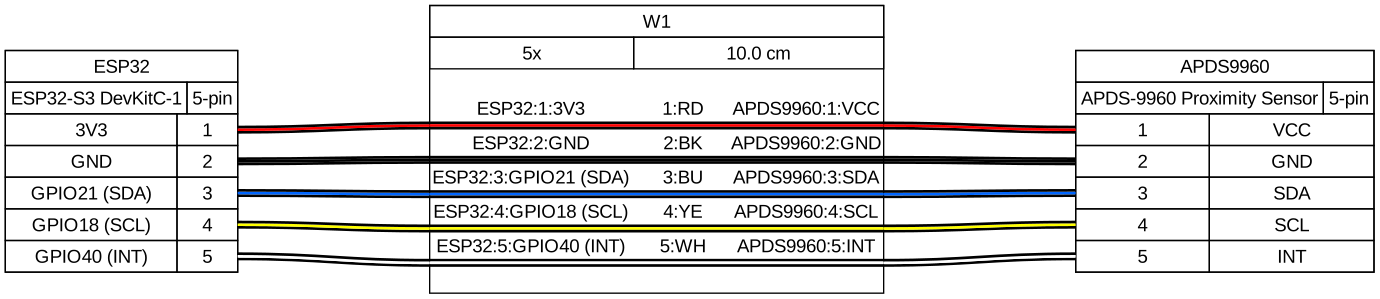
Position the sensor on the breadboard with the lens facing toward where your hand will approach. The sensor's field of view is roughly ±60° and effective up to ~20 cm.
Verification
Flash a minimal test that initialises the sensor and prints to serial when a hand is close:
#include "driver/i2c.h"
#include "esp_log.h"
#include "freertos/FreeRTOS.h"
#include "freertos/task.h"
#define I2C_MASTER_NUM I2C_NUM_0
#define I2C_SDA_GPIO GPIO_NUM_21
#define I2C_SCL_GPIO GPIO_NUM_22
#define APDS9960_ADDR 0x39
// Key APDS-9960 register addresses
#define REG_ENABLE 0x80 // Power on + enable proximity engine
#define REG_PDATA 0x9C // Proximity data (8-bit count)
#define REG_PICLEAR 0xE5 // Clear proximity interrupt
static const char *TAG = "apds9960_test";
static esp_err_t apds_write(uint8_t reg, uint8_t val) {
uint8_t buf[2] = {reg, val};
return i2c_master_write_to_device(I2C_MASTER_NUM, APDS9960_ADDR,
buf, sizeof(buf), pdMS_TO_TICKS(10));
}
static esp_err_t apds_read(uint8_t reg, uint8_t *val) {
return i2c_master_write_read_device(I2C_MASTER_NUM, APDS9960_ADDR,
®, 1, val, 1, pdMS_TO_TICKS(10));
}
void app_main(void) {
// Initialise I2C master
i2c_config_t conf = {
.mode = I2C_MODE_MASTER,
.sda_io_num = I2C_SDA_GPIO,
.scl_io_num = I2C_SCL_GPIO,
.sda_pullup_en = GPIO_PULLUP_DISABLE, // pull-ups on DS3231 breakout
.scl_pullup_en = GPIO_PULLUP_DISABLE,
.master.clk_speed = 400000,
};
i2c_param_config(I2C_MASTER_NUM, &conf);
i2c_driver_install(I2C_MASTER_NUM, I2C_MODE_MASTER, 0, 0, 0);
// Power on + enable proximity engine (bits 0 and 2)
apds_write(REG_ENABLE, 0x05);
vTaskDelay(pdMS_TO_TICKS(10)); // brief settling time
ESP_LOGI(TAG, "APDS-9960 ready");
while (1) {
uint8_t pdata = 0;
apds_read(REG_PDATA, &pdata);
if (pdata > 50) {
ESP_LOGI(TAG, "Proximity detected: count=%d", pdata);
}
vTaskDelay(pdMS_TO_TICKS(100));
}
}
Hold your hand 10–15 cm in front of the sensor. You should see "Proximity detected" in the serial monitor with a count that increases as your hand moves closer. If nothing prints, confirm SDA/SCL are on GPIO21/22 and that VCC is connected to 3.3V (not 5V).
Integrating with the Front Light
The front light is driven by GPIO2 (FL_PWM) via LEDC. Use the INT pin for zero-latency response: configure APDS-9960 proximity interrupts so GPIO40 fires on a falling edge when a hand is near, then start a one-shot timer to turn the light off after a hold period.
#include "driver/gpio.h"
#include "driver/i2c.h"
#include "driver/ledc.h"
#include "freertos/timers.h"
#define PROX_INT_GPIO GPIO_NUM_40
#define FL_PWM_GPIO GPIO_NUM_2
#define APDS9960_ADDR 0x39
#define LIGHT_ON_MS 10000 // front light stays on for 10 s after detection
// APDS-9960 registers
#define REG_ENABLE 0x80
#define REG_PIHT 0x8B // proximity interrupt high threshold
#define REG_PERS 0x8C // persistence register (debounce)
#define REG_CONFIG2 0x90
#define REG_PICLEAR 0xE5
#define REG_ENABLE_PIEN (1 << 5) // proximity interrupt enable bit
static TimerHandle_t s_light_timer;
static void IRAM_ATTR prox_isr_handler(void *arg) {
BaseType_t higher_prio_woken = pdFALSE;
xTimerResetFromISR(s_light_timer, &higher_prio_woken);
portYIELD_FROM_ISR(higher_prio_woken);
}
static void light_timer_cb(TimerHandle_t xTimer) {
ledc_set_duty(LEDC_LOW_SPEED_MODE, LEDC_CHANNEL_0, 0);
ledc_update_duty(LEDC_LOW_SPEED_MODE, LEDC_CHANNEL_0);
}
// Call from your proximity task to clear the APDS-9960 INT flag after each event
void apds_clear_interrupt(void) {
uint8_t reg = REG_PICLEAR;
i2c_master_write_to_device(I2C_NUM_0, APDS9960_ADDR,
®, 1, pdMS_TO_TICKS(10));
}
void proximity_init(void) {
// Enable power + proximity engine + proximity interrupt
uint8_t buf[2];
buf[0] = REG_PIHT; buf[1] = 50; // trigger INT when count > 50 (~15 cm)
i2c_master_write_to_device(I2C_NUM_0, APDS9960_ADDR, buf, 2, pdMS_TO_TICKS(10));
buf[0] = REG_PERS; buf[1] = 0x11; // require 1 proximity cycle to fire INT
i2c_master_write_to_device(I2C_NUM_0, APDS9960_ADDR, buf, 2, pdMS_TO_TICKS(10));
buf[0] = REG_ENABLE; buf[1] = 0x05 | REG_ENABLE_PIEN; // PON + PEN + PIEN
i2c_master_write_to_device(I2C_NUM_0, APDS9960_ADDR, buf, 2, pdMS_TO_TICKS(10));
// Configure GPIO40 falling-edge interrupt (INT is active LOW)
gpio_config_t cfg = {
.pin_bit_mask = (1ULL << PROX_INT_GPIO),
.mode = GPIO_MODE_INPUT,
.pull_up_en = GPIO_PULLUP_ENABLE, // enable internal pull-up as fallback
.pull_down_en = GPIO_PULLDOWN_DISABLE,
.intr_type = GPIO_INTR_NEGEDGE, // falling edge — INT goes LOW
};
gpio_config(&cfg);
gpio_install_isr_service(0);
gpio_isr_handler_add(PROX_INT_GPIO, prox_isr_handler, NULL);
s_light_timer = xTimerCreate("light_off", pdMS_TO_TICKS(LIGHT_ON_MS),
pdFALSE, NULL, light_timer_cb);
}
After each ISR fires, a separate task should call apds_clear_interrupt() to reset the
INT pin — the APDS-9960 holds INT LOW until it is explicitly cleared by writing to
PICLEAR. Clearing from an ISR directly is not safe because I2C is not ISR-compatible;
instead, post to a task queue and clear from task context.
Gotchas
3.3V only — connecting VCC to the 5V rail will damage the sensor. This chip does not have 5V-tolerant I/O.
INT is active LOW — the signal goes LOW when proximity is detected, the opposite of
the old HC-SR501 PIR (which was active HIGH). Configure the GPIO interrupt for
GPIO_INTR_NEGEDGE, not POSEDGE.
Must clear INT in firmware — unlike a GPIO output that deasserts automatically, the APDS-9960 holds INT LOW until you write to PICLEAR (0xE5). If you do not clear it, the interrupt fires once and never again.
Enable sequence — the sensor powers off by default. Write 0x05 (PON=1, PEN=1)
to the ENABLE register (0x80) before reading proximity data. There is no multi-second
startup delay needed, unlike the HC-SR501.
I2C address — the APDS-9960 is at 0x39, which does not conflict with the DS3231 at 0x68. Both devices can coexist on the same SDA/SCL lines.