Wiring the DS3231 RTC
The DS3231 is a real-time clock module. It keeps track of the current time independently of the ESP32, using its own temperature-compensated crystal oscillator and a coin-cell battery. This means the clock survives power outages.
The DS3231 communicates over I2C on address 0x68.
Pin Table
| DS3231 Pin | Wire colour | ESP32-S3 pin label | GPIO # | Notes |
|---|---|---|---|---|
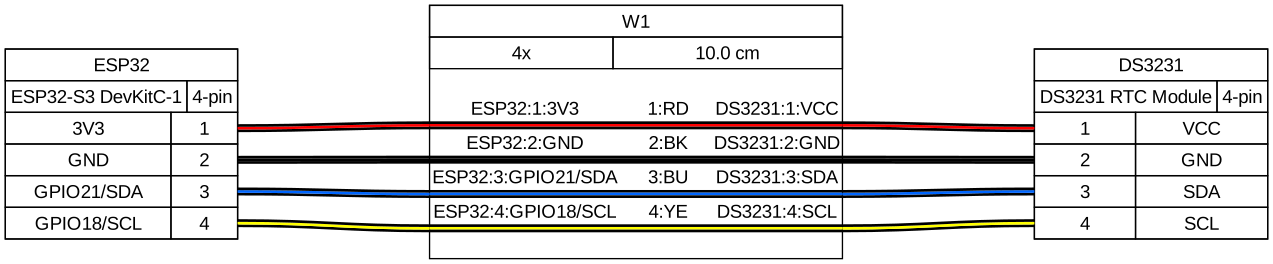
| VCC | Red | 3V3 | — | 3.3 V; the DS3231 also works at 5 V but 3.3 V is cleaner |
| GND | Black | GND | — | |
| SDA | Blue | GPIO21 | 21 | Pull-up resistor (~4.7 kΩ) is on the breakout board |
| SCL | Yellow | GPIO18 | 18 | Pull-up resistor (~4.7 kΩ) is on the breakout board |
| SQW | Orange | GPIO42 | 42 | Active LOW alarm interrupt. Connect in battery mode to wake the ESP32 at alarm time. Add 10 kΩ pull-up to 3.3 V if your breakout does not have one. See battery backup wiring. |
| 32K | (not connected) | — | — | 32 kHz oscillator output; unused |
VCC, GND, SDA, SCL are required. SQW is needed only for battery mode — connect it to GPIO42 if you are adding the battery backup module. The 32K pin is unused.
Circuit Diagram
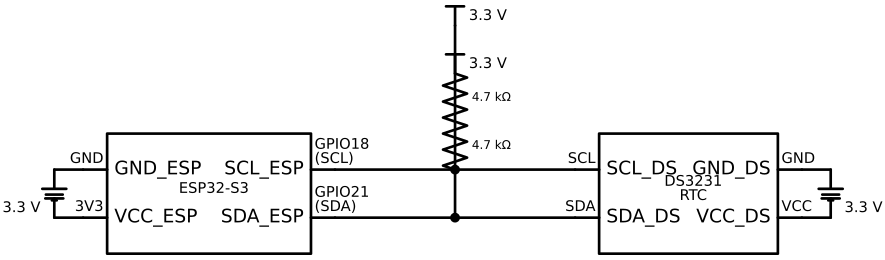
The schematic shows the electrical connections: I2C signals (SDA, SCL) with 4.7 kΩ pull-up resistors to 3.3 V, and power/ground connections.
Wiring Diagram
Verification
After wiring, run the I2C scanner sketch from the I2C concepts doc.
Expected output:
Scanning I2C bus...
  Found device at 0x68
If nothing appears at 0x68:
- Check that VCC is 3.3 V (measure with multimeter)
- Check that SDA and SCL are connected to GPIO21 and GPIO18 respectively
- Verify the pull-up resistors are on the breakout board (look for two small surface-mount resistors near the SDA/SCL pins labelled R1, R2 or similar)
- Try a slower clock speed: change
100000to50000in the I2C config
Battery
Insert a CR2032 rechargeable coin cell into the holder on the DS3231 module. This powers the RTC chip when USB power is disconnected, preserving the time.
Gotchas
- Battery polarity — the coin cell has a + side (the flat side) and a − side. Insert it with the + side facing up (away from the PCB).
- Shared ground — if the DS3231 and ESP32 do not share a common GND, I2C will not work even if SDA and SCL are connected. Always verify GND continuity.
- I2C address conflict — if you add another I2C device later with address 0x68, you will need to change one of them. The DS3231's address is fixed in hardware.