Complete Circuit
This page shows the full schematic for the ESP32 alarm clock — every component and connection on a single diagram.
Use it as a sanity check once you have finished all the wiring steps. Every wire you placed on the breadboard should correspond to a line in this diagram.
Full Schematic
The complete circuit diagram is being updated to reflect the hardware changes (SD card removed, discrete backup circuit added). Use the subsystem diagrams below in the meantime.
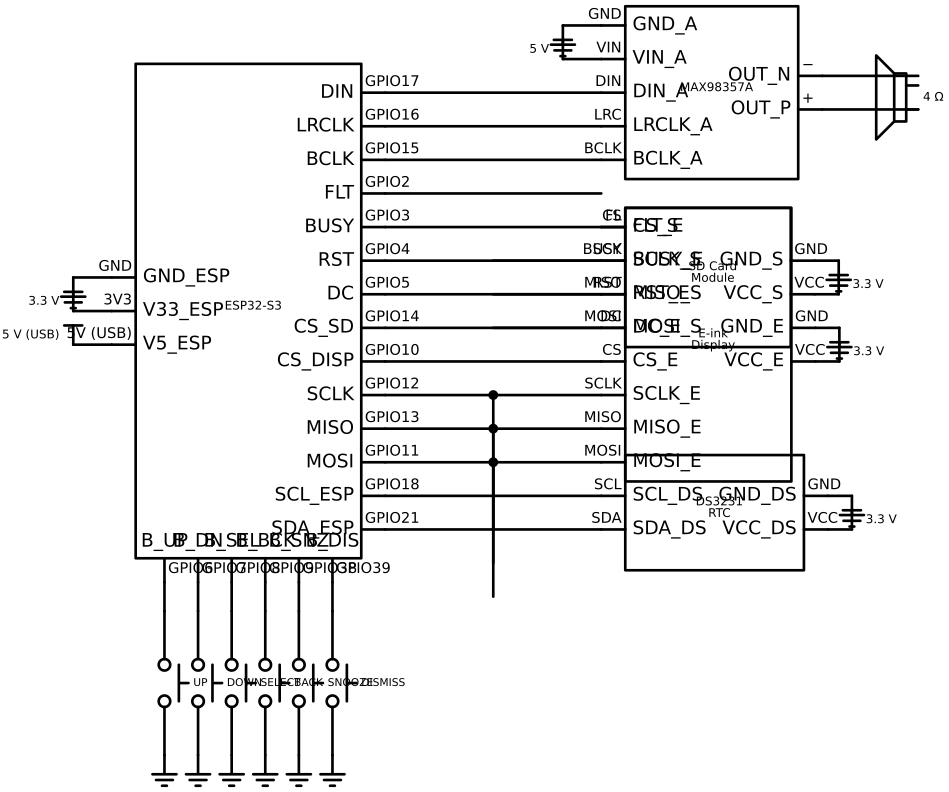
Reading the diagram
Left side of the ESP32 box — power rails: 5 V from USB, 3.3 V from the onboard regulator, and common GND.
Right side, top — I2C bus: SDA (GPIO21) and SCL (GPIO18) connect to the DS3231 RTC. The 4.7 kΩ pull-up resistors on those lines are built into the DS3231 breakout board.
Right side, middle — SPI bus: MOSI (GPIO11), MISO (GPIO13), and SCLK (GPIO12) connect to the e-ink display only. The display chip select is GPIO10. The display also uses three additional control lines: DC (GPIO5), RST (GPIO4), and BUSY (GPIO3).
Right side, lower — I2S audio: BCLK (GPIO15), LRCLK (GPIO16), and DIN (GPIO17) carry the digital audio stream to the MAX98357A amplifier. The amplifier is powered at 5 V (not 3.3 V) and drives the speaker differentially through its + and − output pins.
Bottom of the ESP32 box — six buttons: each connects a GPIO pin directly to GND. The dashed pull-up resistors inside the ESP32 symbol represent the internal ~45 kΩ pull-ups enabled in firmware.
Subsystem diagrams
For a clearer view of each subsystem, see the individual circuit diagrams in the Hardware Assembly → Wiring section:
| Subsystem | Circuit diagram |
|---|---|
| DS3231 RTC | Wiring the RTC |
| E-ink display | Wiring the E-ink Display |
| MAX98357A amplifier + speaker | Wiring the Audio Amplifier |
| Audio storage (LittleFS) | Audio Storage |
| Discrete backup circuit | Wiring the Backup Circuit |
| Buttons | Wiring the Buttons |